
19 Minecraft Crochet Patterns
Get ready to get crafty with these DIY Minecraft crochet patterns.


Hello fellow crafters and gamers! Have you spent countless hours building and exploring in the blocky realms of Minecraft. Did you know that you can bring some of that pixelated fun to life with DIY Minecraft crochet patterns? Yep, you read that right!
DIY Minecraft crochet patterns offer a fun and imaginative way to create Minecraft props, enhancing any DIY Minecraft party or adding a unique touch to your home decor. These handmade items can double as personalized gifts or versatile birthday party decor.
Whether you are setting the scene for a celebration with themed birthday decor or crafting a cozy, blocky blanket for yourself, these DIY Minecraft patterns help bring the vibrant world of Minecraft to life.
What is Minecraft?
Minecraft is a universe of its own. Launched in 2009 by Markus Persson and later developed by Mojang Studios, it quickly became a worldwide sensation. It's a sandbox game where players can build, explore, and manipulate a dynamically generated world of cubic blocks.
The fun game has spawned various Minecraft versions like Minecraft Dungeons and Minecraft Earth, each adding new adventures while maintaining the core's blocky charm. Whether you are crafting items or embarking on quests, Minecraft sparks creativity and problem-solving.
19 DIY Minecraft Crochet Patterns
Get ready to craft your own blocky universe with these 19 DIY Minecraft crochet patterns. Whether you are stitching up an amigurumi Creeper or crafting your own pixel pickaxe, each pattern is a mini adventure on its own. You will not want to miss out on these craft ideas.
1. CROCHET PATTERN NO 2018 CUBEMAN CUBEPIG CUBEMONSTER 3IN1 CROCHET PATTERN BY KRAWKA
If you are looking for a fun way to express your love of the Minecraft video game, these patterns are a great choice. You can use the completed pieces as throw pillows on your bed or stack them to create a fun display.
This set includes 3 DIY Minecraft crochet patterns. You get a CubeMAN, CubePIG, and CubeMONSTER. The completed Minecraft block craft cubes will measure approximately 5.5” x 5.5”.

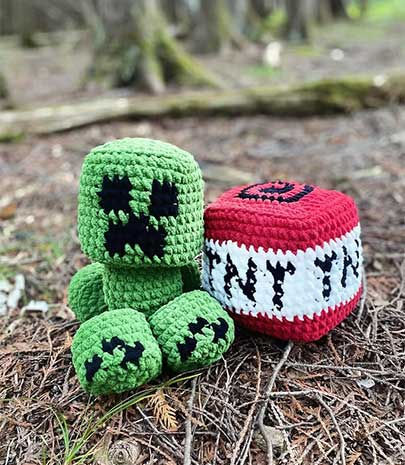
2. CROCHET PATTERN (PDF FILE): MINECRAFT BABY CREEPER AND TNT PLUSHIES (BEGINNER FRIENDLY, LITTLE SEW)
Check out these beginner-friendly DIY Minecraft crochet patterns. With this Minecraft download you can create your very own Baby Creeper and TNT block plushies.
These crochet figures are perfect for decorating a gaming area or gifting to a Minecraft enthusiast.
3. MINECRAFT WOLF DOG CROCHET PATTERN
Here is an adorable Wolf Dog Minecraft crochet pattern. It was designed to be beginner-friendly. It uses basic single crochet stitches to create individual blocks that come together to form a cute blocky wolf.
This DIY Minecraft crochet pattern is 11 pages long and includes lots of step-by-step photos. When finished, the wolf will measure 5.5 inches tall. A cardboard box can be used for stability.

4. MINECRAFT CREEPER COASTER CROCHET PATTERN
Create a unique piece of Minecraft decor with this Creeper face pattern. It is a fun project that is suitable for intermediate level crocheters.
This free Minecraft crochet pattern is designed to be quick and straightforward. It is perfect for whipping up a set of Creeper head coasters in no time.

5. CROCHET PATTERN BEE & BEEHIVE
This Minecraft crochet pattern lets you craft a set of bees and a beehive. The DIY Minecraft block craft pattern is suitable for those with some crochet experience.
The finished sizes will vary based on the hook size used. It recommends either a 2 mm or 3 mm crochet hook for the bees, and a 3 mm crochet hook for the hive.

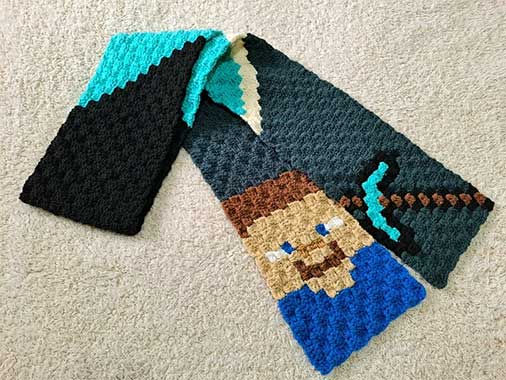
6. CROCHET PATTERN MINECRAFT SCARF, C2C PATTERN STEVE & DIAMOND PICKAXE SCARF, KIDS SCARF, MINECRAFT CROCHET PATTERN, C2C SCARF, PDF DOWNLOAD
This DIY Minecraft scarf crochet pattern is perfect for fans of the game. It features your favorite video game miner Steve, and his Diamond Pickaxe. The pattern comes in two sizes and uses the corner-to-corner (C2C) crochet technique.
The pattern includes color graphs and detailed, row-by-row instructions. It requires nine colors and a 5 mm crochet hook.
7. LARGE MINECRAFT C2C BLANKET PATTERN (DIGITAL)
Are you up for a large scale project? If so, this Minecraft C2C blanket pattern may be just what you are looking for. It is a perfect pattern for intermediate crocheters familiar with the corner-to-corner technique.
This DIY Minecraft crochet pattern includes 20 different Minecraft elements. It is a fantastic project that results in a functional and stylish blanket. Using a #4 yarn and a 4 mm hook the final product will measure approximately 67 x 67 inches.

8. PICKAXE
You can tackle this crochet project with this easy-to-follow Minecraft Pickaxe crochet pattern. This pattern is designed for those familiar with basic crochet techniques such as magic ring, chain stitch, single crochet, slip stitch, and more. It is suitable for intermediate level crocheters.
Using "Yarnart Jeans" yarn, the pattern ensures that each pickaxe is soft yet durable. The pattern is laid out clearly, instructing you on color changes to mimic the iconic pixelated design.

9. ALEX FROM "MINECRAFT" BY ARADIYATOYS
Make your favorite video game explorer with this free Minecraft crochet pattern. Completed, Alex will measure close to 5.3 inches tall. This toy is perfect for fans of the Minecraft game.
To complete this pattern, you will need to be familiar with color changes. You can sell small quantities of toys made from this pattern, as long as you credit the author.

10. CUBE OF DIRT FROM "MINECRAFT" BY ARADIYATOYS
Here is a free Minecraft crochet pattern that allows you to create a cube of dirt. This is a cute little piece that lets you showcase your love of the Minecraft video game.
This downloadable PDF includes clear instructions for crocheting the cube. The DIY Minecraft block craft pattern is perfect for intermediate level crocheters.

11. CROCHET PATTERN (PDF FILE): MINECRAFT ENDERMAN AND GRASS BLOCK PLUSHIES (BEGINNER FRIENDLY, LITTLE SEW)
Create a creepy Enderman plushie holding a grass block with this DIY Minecraft crochet pattern. The Minecraft fan.
The Minecraft download is easy to follow, making it suitable for all levels of crocheters. Once complete, Enderman will make a wonderful addition to your game-themed decor.

12. VIDEO GAME CREEPER HAT CROCHET PATTERN
The Creeper Hat Minecraft crochet pattern is a striking project. It is perfect for those looking to showcase their love for the game while keeping warm and cozy.
It is a one size fits all pattern. The completed hat is very stretch and will fit school aged children through adults. It measures 8.5 inches tall x 9.5 inches wide.

13. CROCHET MINECRAFT BLANKET
This free Minecraft crochet pattern is a unique way to create a pixelated game blanket. With easy-to-follow granny square instructions, you can create a blanket that will fit a single bed.
To complete the project, you'll need to craft 360 granny squares and stitch them together. A chart is included to guide you, showing the placement of each square and detailing the blocks per color, ensuring every piece is perfectly positioned.

14. VIDEO GAME PIXELATED WOLF CROCHET PATTERN
Create your very own wolf with this adorable DIY Minecraft crochet pattern. The completed project is perfect for gifts and decorations.
Available as a digital download, this Minecraft crochet pattern is a fun and creative way to celebrate your passion for the game. Get started today and bring this fun wolf from the game to life.

15. MINECRAFT CREEPER SLIPPERS
These Minecraft Creeper Slippers are a fun and easy project for fans of the video game. Along with the green creepers pattern is a link to a video tutorial to make the project even easier.
The simple craft pattern is suitable for beginners and only uses basic crochet stitches. Do not miss out on this free Minecraft crochet pattern.

16. MINECRAFT TNT PILLOW (FOR CROCHET GRAPHGHANS, C2C OR CROSS-STITCH)
Add a touch of the popular video game to your home decor with this TNT pillow. This design is perfect for those looking to create unique pieces that fans of the Minecraft video game will instantly recognize.
The Minecraft block craft is worked using the C2C crochet technique. The completed pillow will measure approximately 12 inches on each side.

17. THE EXPLODING CREEP PDF PATTERN
The Exploding Creep PDF pattern is fun and whimsical design. It would make a wonderful addition to a gamer's winter wardrobe.
Included are sizes toddler, child, and adult. To complete the DIY Minecraft crochet pattern you will need an I hook, worsted weight yarn, tapestry needle, scissors, and a measuring tape.

18. CROCHET WARDEN PLUSHIE PATTERN
The Warden Plushie Pattern is a unique Minecraft crochet pattern. It is a great choice for fans that already have everything.
This is an intermediate level crochet pattern. It is written in English and uses standard crochet terms.

19. MINING GAME CROCHET BLANKET PATTERN PDF MOB HEADS
The Mining Game Crochet Blanket Pattern features several favorite characters from the crazy video game world. This cozy blanket will add warmth and a bit of color to any bedroom or game room.
Included in the DIY Minecraft download are grids of each individual head. Once assembled, the blanket will measure about 33.86 inches x 42.13 inches.

Why not put down the game controller and pick up a crochet hook instead? Get out your basic crafting materials and get busy these iconic and much-loved video game characters. Imagine the fun you will have creating your own Minecraft world with all these craft ideas.


I cannot wait to see your completed DIY Minecraft crochet patterns.
Go88en gives me a different perspective when I evaluate the relationship between visual content and navigation. I usually observe the main menu first and then select an area that relies strongly on images. Fish Shooting becomes particularly interesting because the visual presentation plays an important role in introducing the available content. I compare how the category appears on desktop and mobile, paying attention to image size, spacing, and the position of navigation elements. After viewing the selection, I return to the main page and look for the same recognizable references. This helps me understand how the layout supports finding content across different devices.
luckywin mang đến cho mình thêm một cách quan sát khi thử duy trì toàn bộ hành trình trên điện thoại. Mình có lần bắt đầu với Bắn cá, tìm hiểu Nàng Tiên Cá rồi chuyển sang Xổ số để quan sát hình thức siêu tốc. Sau đó, mình tiếp tục với Casino và dành thời gian khám phá Sicbo. Trong quá trình sử dụng, mình chú ý đến vị trí các danh mục và cách thông tin được trình bày theo chiều cuộn. Có lúc mình muốn tìm lại phần đã xem trước đó nên thử dựa vào tên gọi thay vì ghi nhớ chính xác vị trí. Những thao tác như vậy giúp mình nhận ra cách lựa chọn…
EX88 app làm mình để ý kỹ hơn đến cách trải nghiệm được nối tiếp khi thay đổi thiết bị trong cùng một thói quen sử dụng. Mình thường bắt đầu trên PC rồi tiếp tục bằng Mobile App để xem những bước đã quen được thể hiện ra sao. Khi sử dụng Bắn cá một lúc, mình chuyển sang Nổ hũ trên điện thoại và vẫn nhận biết được những khu vực chính. Không gian hiển thị được thu gọn nhưng cách tìm nội dung không tạo cảm giác quá khác biệt. Mình có thể dựa vào những vị trí đã ghi nhớ để tiếp tục thay vì làm quen lại từ đầu. Sau nhiều lần sử dụng xen kẽ,…
https://mu88vn.in.net/ làm tôi quan tâm khi kiểm tra cách giao diện thích ứng với màn hình nhỏ. Tôi quan sát kích thước chữ, khoảng cách nút và vị trí menu trước khi sử dụng. Trong quá trình này, tôi xem Casino, Tài xỉu và Đá gà để đánh giá khả năng nhận diện khi không gian hiển thị bị thu hẹp. Các khu vực được đặt tên rõ giúp tôi xác định nội dung nhanh hơn và hạn chế thao tác nhầm. Tôi cũng chú ý đến cách quay lại trang trước và khả năng giữ vị trí điều hướng quen thuộc. Khi những thành phần chính không thay đổi quá nhiều, tôi dễ hình thành thói quen sử dụng. Từ…
https://xx88.reviews/ làm mình để ý đến cách Xổ số tạo một hướng tìm khá riêng khi mình bắt đầu từ Lô đề siêu tốc. Sau khi vào đúng khu, mình tập trung vào thông tin đang cần thay vì tiếp tục mở thêm nhiều lựa chọn cùng loại. Khi muốn chuyển sang Thể thao, mình quay lại lớp điều hướng rồi chọn Esports làm điểm bắt đầu mới. Hai phạm vi có cách trình bày nội dung khác nhau nên mình dễ nhận ra lúc nào quá trình chuyển khu đã hoàn tất. Việc chỉ giữ một vài điểm chính trong mỗi lượt cũng khiến thao tác gọn hơn, nhất là khi mình đã có mục tiêu tương đối rõ ngay…